Case Study: Bwindi Community Hospital
An open-source PACS system and viewer were installed at the Bwindi Community Hospital in Southern Uganda 2 ½ years ago. This project was funded by a grant from Rotary International, with medical-grade monitors donated by Double Black Imaging, software donated by Idonia, and assistance from DMIST volunteers during installation and support. The configuration is shown in the illustration below:
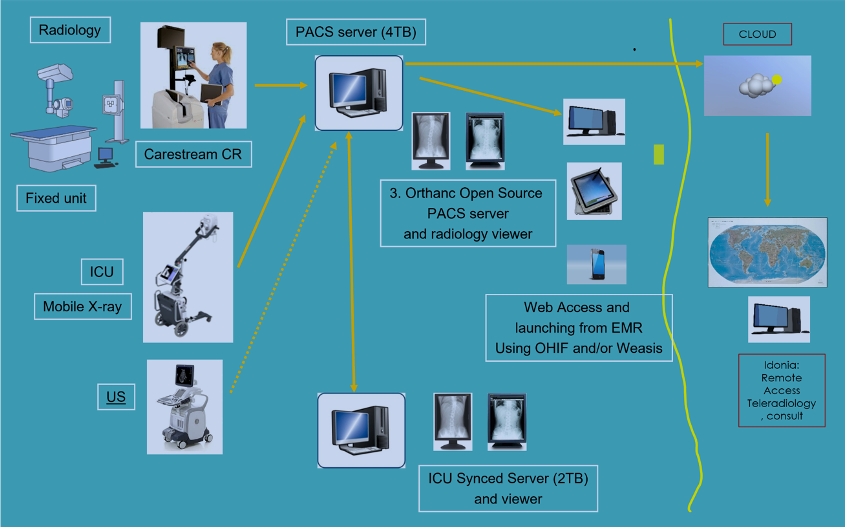
BCH Configuration
We found a used fixed X-ray table and wall stand, along with a Carestream CR, in NYC at a defunct clinic, and purchased a new portable X-ray with a digital plate. The site already had a used Ultrasound. An open-source PACS (Orthanc) was chosen for its ease of installation and because this is a relatively small institution that should be served by this configuration. There are two instances of the PACS, both on separate desktop servers that were custom-built and shipped from the US. One has a 4TB capacity, and the secondary has a 2TB capacity, which should provide at least 5 years of storage. A script was created that syncs both PACS systems, and using web viewers (Osimis or OHIF), one can access either system if one happens to go down. One server was installed inside the radiology reading room, the other one in the ICU. Software donated from Idonia allows for uploading images to the cloud for a second opinion.
The workflow at the facility is as follows:
A Patient is selected in the universal Ugandan Electronic Health Record (EMR). The order is being reviewed in the radiology tab and in patient history/admitting diagnosis in the main menu, so the technologist knows what to perform and what the ordering physician is looking for. The patient's name and age are manually copied, along with the new nationwide patient ID, either on paper or by taking a photo with a phone. (We are investigating a potential HL7v2 connection in the future)
The patient information is entered on the CR console or portable X-ray console, and the proper procedure is selected.
Acquisition is performed, the technologist will use the L/R marker. One or more views are acquired.
For the portable X-ray, the images are reviewed on the portable monitor and QA’ed (check for movement, artifacts, and, if needed, cropped or rotated). For the fixed unit, the X-ray cassette is placed into the CR reader, which pulls the stimulable phosphor plate out of the cassette, reads the image, and erases the plate for the next exposure. Image is QA’d on the Carestream monitor.
If the image passes the QA check, it is sent (pushed) to the PACS. In the past, technologists would print a film at this point, but that is now done from the PACS if a hardcopy is needed.
As soon as the study arrives at the Orthanc PACS server, it will be forwarded automatically to the second server, which provides redundancy in case either one of the servers goes down or needs service.
Images are reviewed on the high-resolution diagnostic 3MP medical monitors using the Weasis, OHIF, or Osimis PACS viewing software. Portable X-ray images are identified as Modality DX, and those from the fixed unit as Modality CR. Prior studies, if performed since the PACS was installed, should be retrievable if the name matches. The technologist might need to search the Orthanc PACS worklist for any prior cases.
Only if absolutely necessary (ortho, OR, outside referrals), the images will be printed to create a hardcopy film. We had trouble finding an open-source viewer that supports DICOM printing, but Weasis has that capability, so we installed it just for printing.
The findings are entered in the EMR, which can be accessed by the ordering physician.
If so desired, the ordering physician can access the images using the Weasis viewer, as this is installed at each of the hospital computers. Note that in the future, the physician will be able to access those via a link directly from the EMR patient record, but this requires the EMR provider to open an API so that Bwindi can connect.
The same workflow is used for the MindRay Ultrasound, only that the images are reviewed on the US monitor in this case. Images are sent to PACS as well, allowing a physician to review both US and X-ray images side by side and providing redundancy and backup. There is still an issue with DICOM licensing at this US unit, which is common in these countries, as vendors want to charge for DICOM connectivity.
Optionally, all images that are archived on the PACS can be accessed through the Orthanc worklist, which provides the capability to upload them to the Idonia cloud and create a link to email to a consulting radiologist, who can review them from any location in the world. The same mechanism can be used to share a copy with a referring physician.
We learned a couple of things, most importantly, the desire to print a hard copy, as physicians and patients are used to having a film. We moved the connection from the Carestream printer to the PACS so they could print any priors (the Carestream local disk would automatically erase the old images, which meant that, after about 6 months, they would no longer be printable). As the charge for an X-ray procedure is about $1, and the cost of a film (they use 8 by 10” films to save cost) is $1.50, so they lose money on every procedure. Getting them “weaned off” from film is a major challenge, which I assume is a universal issue in these developing countries. (80% of the rural facilities in Africa still are film-based). Another thing we learned is the problem with unique patient identification, which could be greatly reduced by having a digital connection between the EMR and modalities using a DICOM worklist. Lastly, there is a big opportunity to use AI for detection, as there is no radiologist on site to read these images, something we will be investigating.
We are planning to connect dental and ophthalmology in the spring of 2026.